What is an AI agent? The loop, explained with code
An AI agent is a model that calls tools in a loop until a goal is met. A runnable Python loop, what each step costs in tokens, and where agents break.
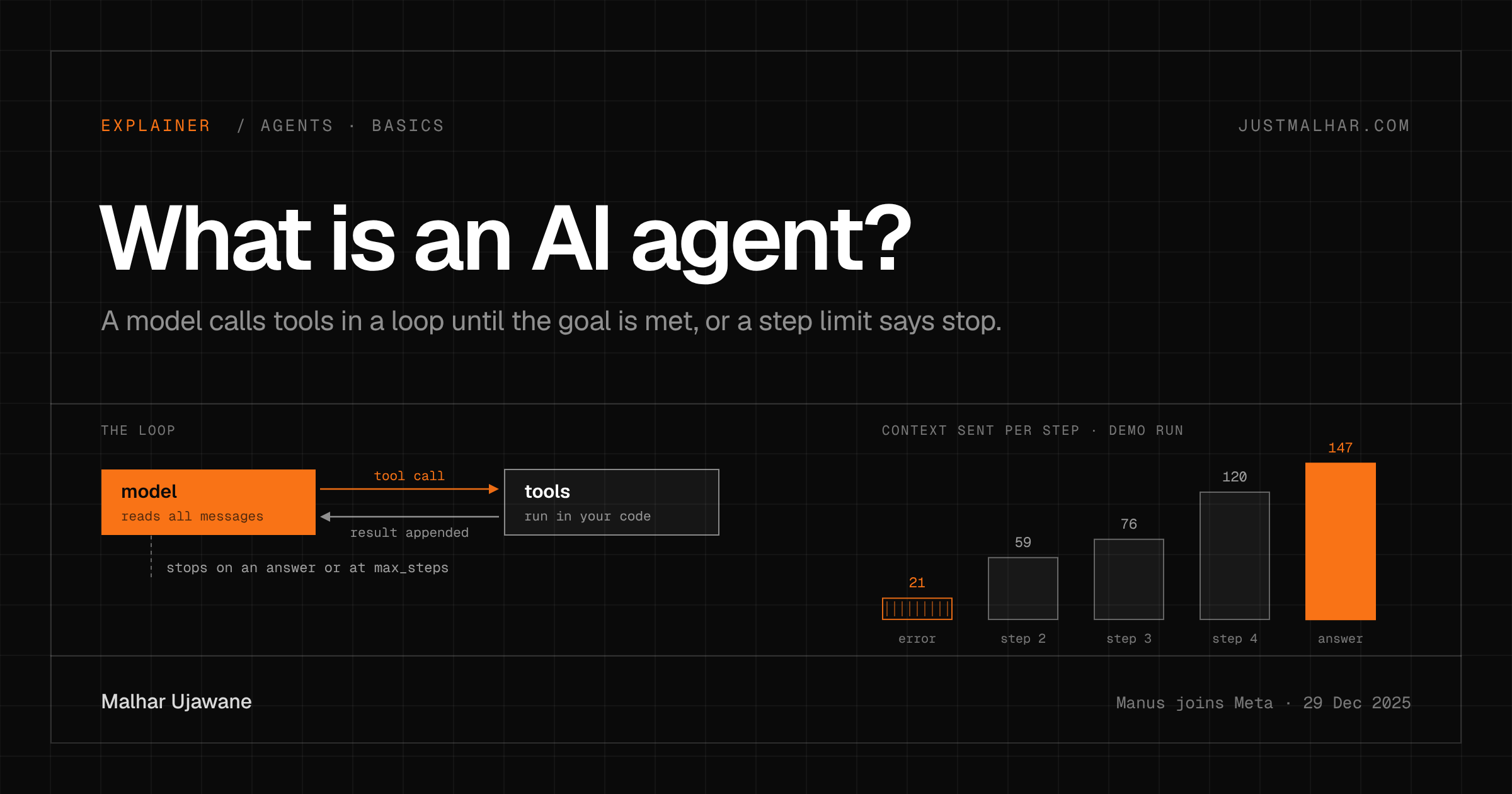
An AI agent is a language model that calls tools in a loop until it reaches a goal or hits a limit. Your code runs the tools, feeds each result back into the conversation, and asks the model what to do next; the model decides when it’s done.
What happened with agents this week?
On December 29, 2025, Meta announced that Manus, the Singapore-based company behind a general-purpose agent, is joining Meta. Meta says it will keep operating and selling the Manus service and bring it into its own products, including Meta AI. Manus’s post says its agent has processed more than 147 trillion tokens and created more than 80 million virtual computers; those are the company’s own figures.
In July the Manus team wrote Context Engineering for AI Agents, which explains why they chose to build on the in-context learning of frontier models instead of training an end-to-end agent model, and put their effort into the loop around the model. A product built that way is mostly loop, which makes this a good week to pin down what an agent actually is.
What is the definition of an AI agent?
The definition I use is Simon Willison’s from September 2025: “An LLM agent runs tools in a loop to achieve a goal.” Each part of it does work. The tools are what let the model act on anything outside its own text, the loop lets it react to what happened, and the goal gives the loop a reason to stop.
Anthropic’s Building effective agents (December 2024) draws the line I care about as a builder. In a workflow, “LLMs and tools are orchestrated through predefined code paths”. In an agent, the model directs its own process and tool use. The difference is who picks the next step: your code or the model.
That choice decides your bill and your failure modes. A workflow has a known number of calls, so you can price it and test every path. An agent might take three steps or thirty, and every step is another model call that can go wrong.
What does the smallest AI agent look like?
Here’s a complete agent in about 60 lines. The model is a scripted stand-in so it runs without an API key; everything else (the tool registry, the message list, the loop, the step limit) has the same shape it would have with a real model behind it.
# agent_loop.py: the smallest useful agent loop. Python 3.10+, tiktoken==0.12.0 (only to count tokens).
# The "model" is a scripted stand-in so this runs without an API key. Swap fake_model() for a
# real chat API call with tool calling and the loop below stays the same.
import json, os
import tiktoken

enc = tiktoken.get_encoding("o200k_base")

# 1. Tools: plain functions plus a description the model reads.
def list_files():
    return sorted(f for f in os.listdir(".") if f.endswith(".csv"))

def read_file(path):
    with open(path) as f:          # raises FileNotFoundError on a bad path
        return f.read()

def add(numbers):
    return sum(numbers)

TOOLS = {"list_files": list_files, "read_file": read_file, "add": add}

# 2. The model: reads the whole conversation, returns a tool call or a final answer.
def fake_model(messages):
    last = messages[-1]["content"]
    step = sum(m["role"] == "tool" for m in messages)
    if step == 0:
        return {"tool": "read_file", "args": {"path": "invoice.csv"}}   # a wrong guess
    if "FileNotFoundError" in last:
        return {"tool": "list_files", "args": {}}
    if "invoices.csv" in last and "client" not in last:
        return {"tool": "read_file", "args": {"path": "invoices.csv"}}
    if last.startswith("client,"):
        amounts = [int(r.split(",")[1]) for r in last.strip().splitlines()[1:]]
        return {"tool": "add", "args": {"numbers": amounts}}
    return {"answer": f"Total invoiced: Rs {int(last):,}"}

# 3. The loop: call the model, run the tool, append the result, repeat until it answers.
def run(goal, model=fake_model, max_steps=10):
    messages = [{"role": "system", "content": "You can call: " + ", ".join(TOOLS)},
                {"role": "user", "content": goal}]
    for step in range(1, max_steps + 1):
        sent = sum(len(enc.encode(m["content"])) for m in messages)
        action = model(messages)
        if "answer" in action:
            print(f"step {step}  context {sent:3d} tok  ANSWER  {action['answer']}")
            return action["answer"]
        try:
            result = str(TOOLS[action["tool"]](**action["args"]))
        except Exception as e:                       # keep the failure in context
            result = f"{type(e).__name__}: {e}"
        messages.append({"role": "assistant", "content": json.dumps(action)})
        messages.append({"role": "tool", "content": result})
        print(f"step {step}  context {sent:3d} tok  {action['tool']}({json.dumps(action['args'])}) -> {result!r}")
    print(f"stopped after {max_steps} steps without an answer")
    return None

run("What is the total amount in our invoices CSV?")

# 4. A model that never decides it's done. The step limit is the only thing that stops it.
print()
run("What is the total amount in our invoices CSV?",
    model=lambda messages: {"tool": "list_files", "args": {}}, max_steps=3)
It reads a three-row invoices.csv (client, amount_inr) sitting next to it. Output (Python 3.13.5, tiktoken 0.12.0):
step 1  context  21 tok  read_file({"path": "invoice.csv"}) -> "FileNotFoundError: [Errno 2] No such file or directory: 'invoice.csv'"
step 2  context  59 tok  list_files({}) -> "['invoices.csv']"
step 3  context  76 tok  read_file({"path": "invoices.csv"}) -> 'client,amount_inr\nAcme Labs,42000\nBlue Fern,18500\nKite Studio,27250\n'
step 4  context 120 tok  add({"numbers": [42000, 18500, 27250]}) -> '87750'
step 5  context 147 tok  ANSWER  Total invoiced: Rs 87,750

step 1  context  21 tok  list_files({}) -> "['invoices.csv']"
step 2  context  38 tok  list_files({}) -> "['invoices.csv']"
step 3  context  55 tok  list_files({}) -> "['invoices.csv']"
stopped after 3 steps without an answer
The first run guesses a file name, gets an error, lists the directory, reads the right file, adds the numbers and answers. The second run never decides it’s finished, and only max_steps stops it.
How does an AI agent work, step by step?
The model is stateless. Every call sends the full list of messages, and the model returns one of two things: a structured request to call a tool, or a final answer. With a real API, the tool request arrives as JSON that matches a schema you declared, which is what “tool calling” or “function calling” means in provider docs.
Your code, which people call the harness, does everything else: it runs the tool, catches what breaks, appends the call and its result to the messages, and calls the model again. The model never touches your files; it asks, and the harness decides whether to do it. That’s also where you put permissions and the sandbox.
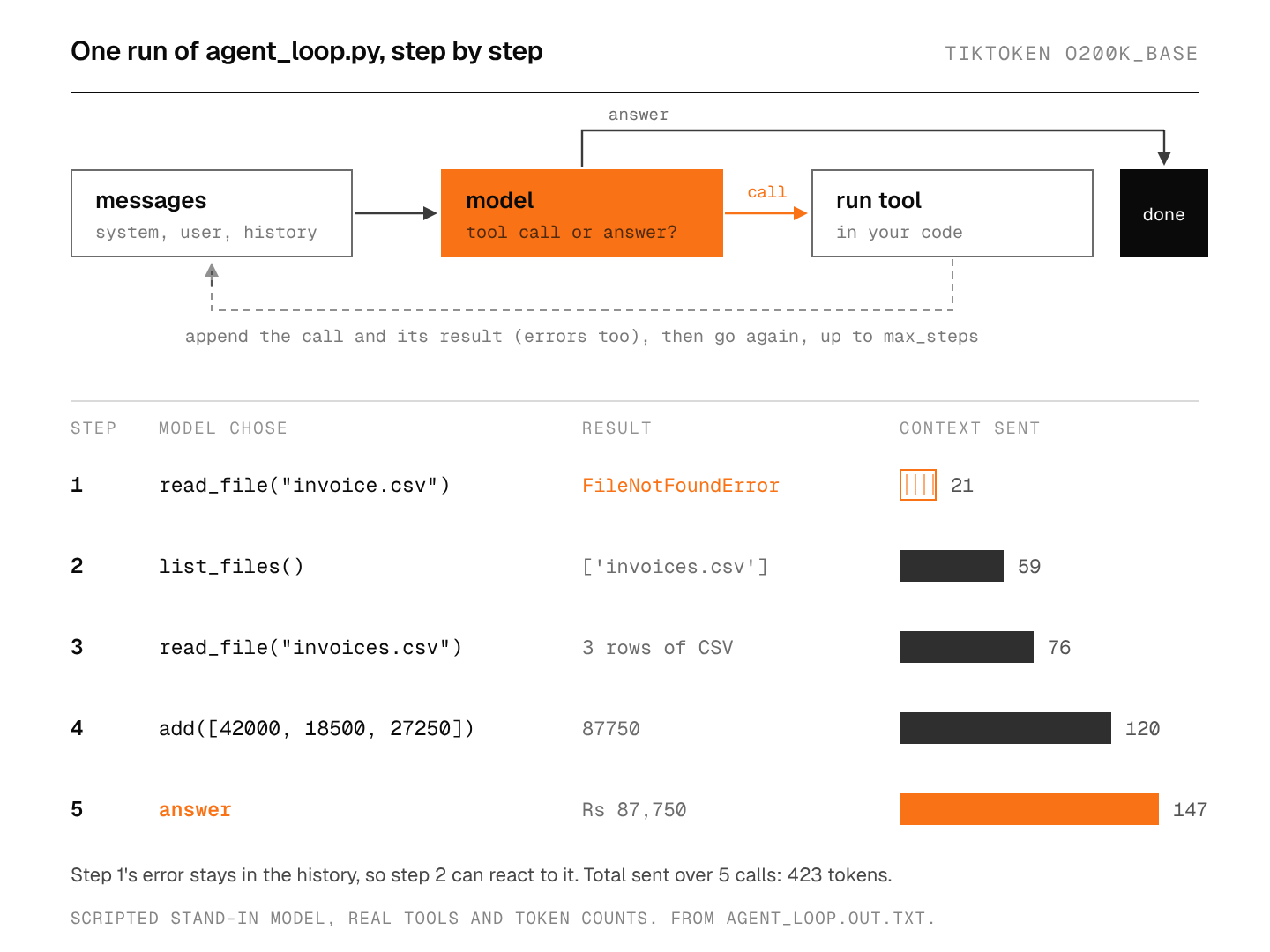
Look at the token column. The context grows from 21 to 147 tokens because each step adds a call and a result, and the run as a whole sends 423 input tokens across five calls to produce a few short JSON actions. Real tasks have bigger tool results and more steps. Manus’s context engineering post puts its average input-to-output ratio at around 100:1 and its typical task at around 50 tool calls. That’s why I care about context windows and about how big each tool result is, more than about output length.
What is the difference between an AI agent and a workflow?
In a workflow, your code fixes the sequence: call the model to classify the email, then call it to draft a reply, then send the draft for review. In an agent, the model picks the next tool each time based on what it has seen so far.
Anthropic’s advice is to find the simplest thing that works and add complexity only when it pays for itself: “This might mean not building agentic systems at all.” I agree. If I can write the steps down in advance, I want a workflow, because I can test every path and know the cost per run. I’d reach for an agent when the number of steps depends on what the tools return: debugging, research, or exploring a codebase I’ve never seen.
Where do AI agents break?
They loop. The second run above is the simplest version: a model that keeps calling a tool and never answers. Set max_steps, and treat hitting it as a failure you log and look at.
They guess. Step 1 guessed invoice.csv. A good harness turns a bad guess into a useful error message instead of a crash. Manus’s advice is to “leave the wrong turns in the context” so the model can see the failure and change course, which is what the except branch does.
The context fills up. Every result stays in the history, so long tasks run into the context window and the bill grows with every turn. Manus writes large observations to files and keeps only the path or URL in context, so the content can be read back later. I wrote about a related trick, code execution with MCP, where the agent filters data in code before any of it reaches the model.
Too many tools. Tool definitions sit at the front of the context, and a long, overlapping list makes wrong picks more likely. MCP makes it easy to plug in dozens of tools, which is exactly when this shows up. Agent skills take the opposite approach for instructions: the agent sees only each skill’s name and short description until a task needs the rest.
Tools act for the model. Anything a tool returns can contain instructions, and the model may follow them. Give each tool the least access it needs, and keep anything destructive behind a confirmation step.
The cache breaks. Each call reuses the earlier messages as a prefix, which is what makes prompt caching work for agents. Manus warns against putting a timestamp at the top of the system prompt and against non-deterministic JSON key order, because either one changes the prefix and turns every call into a cache miss.
What would I take from this?
Write the loop yourself once, even if you’ll use a framework later. Anthropic suggests starting with the LLM APIs directly for the same reason: the loop is short, and frameworks can hide the prompts and responses you need to see when something goes wrong.
My opinion on the Manus news: the model is becoming the part you rent, and the harness is the part you own. The context-engineering post is a list of harness decisions (what stays in context, what goes to files, how errors are shown, which tools are visible), and none of it requires training a model. If that’s where the value is, it’s also where a builder like me should spend effort.
FAQ
Is ChatGPT an AI agent?
It depends on the feature. Plain chat answers in one step, so it isn’t one by the tools-in-a-loop definition. “ChatGPT agent”, which OpenAI launched in July 2025, drives a real browser to complete tasks, so it is. Simon Willison’s post notes that OpenAI uses the word for several different things.
Do I need a framework to build an AI agent?
No. The loop above is the core of every agent framework. Frameworks add retries, tracing, streaming and provider adapters, which help in production, but Anthropic’s guidance is to understand the underlying code first, because “incorrect assumptions about what’s under the hood are a common source of customer error.”
Do AI agents have memory?
They have short-term memory in the message list: that’s how step 2 knew step 1 failed. Long-term memory across tasks needs something extra, usually a tool that writes to and reads from a file or database.
How do I stop an AI agent from running forever?
Give the loop a hard step limit, a token or cost budget, and a timeout, and stop on whichever comes first. Then log the runs that hit a limit, because those are the tasks your tools or prompt don’t handle yet.
Sources
- Meta, Manus Joins Meta: Accelerating AI Innovation for Businesses, December 29, 2025; Manus, Manus Joins Meta for Next Era of Innovation, December 29, 2025
- Yichao “Peak” Ji, Context Engineering for AI Agents: Lessons from Building Manus, July 18, 2025
- Simon Willison, I think “agent” may finally have a widely enough agreed upon definition to be useful jargon now, September 18, 2025
- Anthropic, Building effective agents, December 19, 2024