What are agent skills? SKILL.md and progressive disclosure
Agent skills are folders with a SKILL.md that agents load in stages. The spec, a runnable demo, and what each stage costs in tokens.
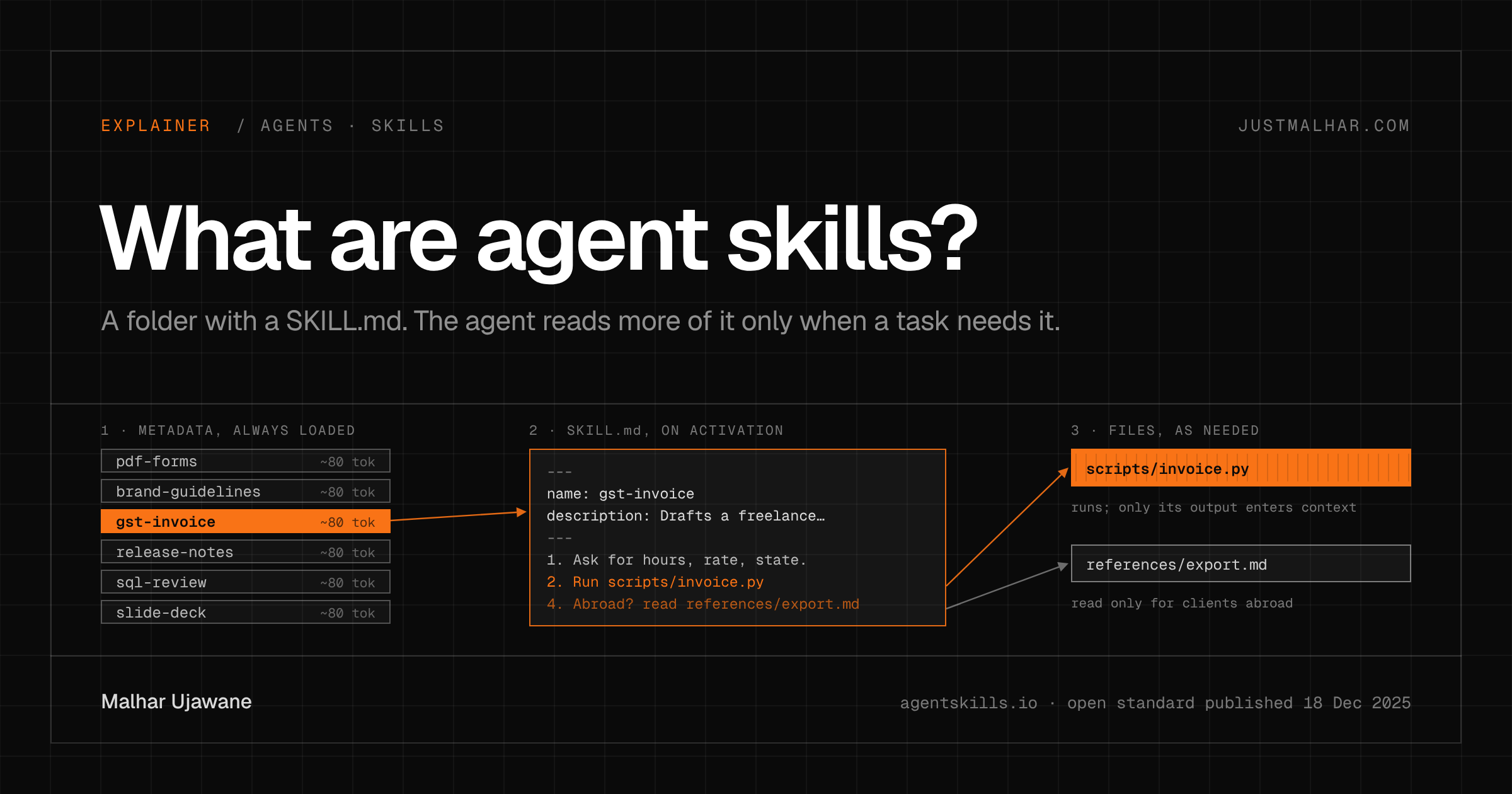
Agent skills are folders of instructions, scripts and reference files that an AI agent loads only when a task needs them. Each skill has a SKILL.md file with a name and a description at the top; the agent sees those two fields at startup and reads the rest on demand. On December 18, 2025, Anthropic published the format as an open standard at agentskills.io, with a specification and a small reference library.
What happened to agent skills this week?
Anthropic first shipped skills for Claude in October. This week’s announcement added skills that Team and Enterprise admins can roll out to everyone, a directory of partner-built skills from Notion, Canva, Figma, Atlassian and others, and the open standard. The agentskills/agentskills repo holds the spec and skills-ref, a Python library that validates a skill and builds the prompt block an agent needs.
On launch day the site’s adoption section listed Claude, Claude Code, Cursor, VS Code, GitHub, OpenCode, Amp, Letta and Block. Nine days earlier, Anthropic donated MCP to the Linux Foundation’s new Agentic AI Foundation (I explained MCP here), so this is the second agent format it has opened up this month.
Why do agent skills matter to a builder?
An agent’s system prompt tends to collect everything a team knows: how branches are named, how invoices look, which test command to run. Every one of those rules is billed on every request, whether the task needs it or not. Skills split that prompt into chapters with a table of contents. The agent always pays for the table of contents, a name and a sentence or two per skill, and pays for a chapter only when it opens it. Anthropic calls this progressive disclosure.
It’s the same cost argument I made about tool definitions in code execution with MCP: whatever sits in the context on every turn gets paid for on every turn.
Skills also travel well. A skill is Markdown plus scripts in a folder, so it can live in git, go through code review, and work in any agent that reads the format.
What does an agent skill look like?
The smallest valid skill is one file in a folder with the same name:
---
name: release-notes
description: Writes user-facing release notes from git history. Use when the user asks for release notes, a changelog entry, or "what changed since vX".
---

# Release notes

1. Run `git log --oneline PREVIOUS_TAG..HEAD`.
2. Drop merge commits, dependency bumps and anything under `test/`.
3. Group the rest under "New", "Fixed" and "Changed". One line each, user-facing words.
4. End with the exact compare link if the repo is on GitHub.
The specification requires two frontmatter fields. name is 1 to 64 characters of lowercase letters, digits and hyphens, and it must match the folder name. description can run to 1,024 characters and should say what the skill does and when to use it. The optional fields are license, compatibility, metadata and an experimental allowed-tools. The body after the frontmatter is free-form Markdown.
A bigger skill adds folders. Here is a toy one that drafts a GST invoice (the same made-up invoice from my MCP post), with a script for the math and a reference file it only needs for clients outside India:
skills/
├── gst-invoice/
│   ├── SKILL.md
│   ├── scripts/invoice.py
│   └── references/export.md
├── release-notes/
│   └── SKILL.md
└── Release_Notes/          # broken on purpose, see below
    └── SKILL.md
---
name: gst-invoice
description: Drafts a freelance invoice in Indian rupees with GST. Use when the user asks for an invoice, a quote with tax, or the GST on an amount.
license: MIT
---
# GST invoice
1. Ask for hours, hourly rate in rupees, and the client's state.
2. Run `python scripts/invoice.py HOURS RATE SAME_STATE` where SAME_STATE is `yes`
if the client is in the same state as the freelancer, otherwise `no`.
3. Paste the script's output into the invoice table. Never do the tax math yourself.
4. If the client is outside India, read `references/export.md` before writing anything.Step 3 is the part I like most. Tax math belongs in code, where it gives the same answer every time, and the model only reads the printed result. The script is 13 lines of Python, and the 18% rate in it is an example input, not tax advice:
$ python skills/gst-invoice/scripts/invoice.py 12.5 2500 no
Subtotal: ₹31,250
IGST 18%: ₹5,625
Total: ₹36,875
How do agent skills load into the context window?
In three stages, and you can measure each one. This script validates every skill in the folder with skills-ref, prints the block an agent would put in its system prompt, and counts tokens at each level:
# budget.py: what each level of an Agent Skill costs in context.
# pip install "git+https://github.com/agentskills/agentskills@f990ba1#subdirectory=skills-ref" tiktoken==0.12.0
from pathlib import Path
import tiktoken
from skills_ref import validate, to_prompt

enc = tiktoken.get_encoding("o200k_base")      # OpenAI's tokenizer; other tokenizers give different counts
tok = lambda s: len(enc.encode(s))

dirs = sorted(Path("skills").iterdir())
good = []
for d in dirs:
    problems = validate(d)
    print(f"{d.name:14} {'ok' if not problems else 'INVALID'}")
    for p in problems:
        print(f"   - {p}")
    if not problems:
        good.append(d)

print("\nLevel 1, loaded at startup for every skill:")
block = to_prompt(good)
print(block)
print(f"-> {tok(block)} tokens for {len(good)} skills")

print("\nLevel 2 and 3, loaded only when used:")
for d in good:
    body = tok((d / "SKILL.md").read_text())
    extra = sum(tok(f.read_text()) for f in d.rglob("*") if f.is_file() and f.name != "SKILL.md")
    print(f"{d.name:14} SKILL.md {body:4} tokens   bundled files {extra:4} tokens")
Output (Python 3.13.5, skills-ref at commit f990ba1 from December 18, tiktoken 0.12.0):
Release_Notes INVALID
- Unexpected fields in frontmatter: version. Only ['allowed-tools', 'compatibility', 'description', 'license', 'metadata', 'name'] are allowed.
- Skill name 'Release_Notes' must be lowercase
- Skill name 'Release_Notes' contains invalid characters. Only letters, digits, and hyphens are allowed.
gst-invoice ok
release-notes ok
Level 1, loaded at startup for every skill:
<available_skills>
<skill>
<name>
gst-invoice
</name>
<description>
Drafts a freelance invoice in Indian rupees with GST. Use when the user asks for an invoice, a quote with tax, or the GST on an amount.
</description>
<location>
/tmp/demo/skills/gst-invoice/SKILL.md
</location>
</skill>
<skill>
<name>
release-notes
</name>
<description>
Writes user-facing release notes from git history. Use when the user asks for release notes, a changelog entry, or "what changed since vX".
</description>
<location>
/tmp/demo/skills/release-notes/SKILL.md
</location>
</skill>
</available_skills>
-> 162 tokens for 2 skills
Level 2 and 3, loaded only when used:
gst-invoice SKILL.md 181 tokens bundled files 247 tokens
release-notes SKILL.md 115 tokens bundled files 0 tokensLevel 1, metadata. At startup the agent puts each skill’s name, description and file path in its system prompt. The spec budgets about 100 tokens per skill; my two cost 162 together. The <available_skills> XML is the format the integration guide recommends for Claude, and other agents may format it differently.
Level 2, instructions. When a request matches a description, the agent reads the whole SKILL.md. There’s no special API for this: a filesystem-based agent runs something like cat /path/to/SKILL.md, and a tool-based agent gets a tool that returns the file. The spec recommends keeping the body under 5,000 tokens and 500 lines.
Level 3, files. Scripts and references load only if the instructions send the agent to them. Scripts get executed, so their source code stays out of the context. invoice.py is 193 tokens of Python; what lands in the context is its 25-token output.
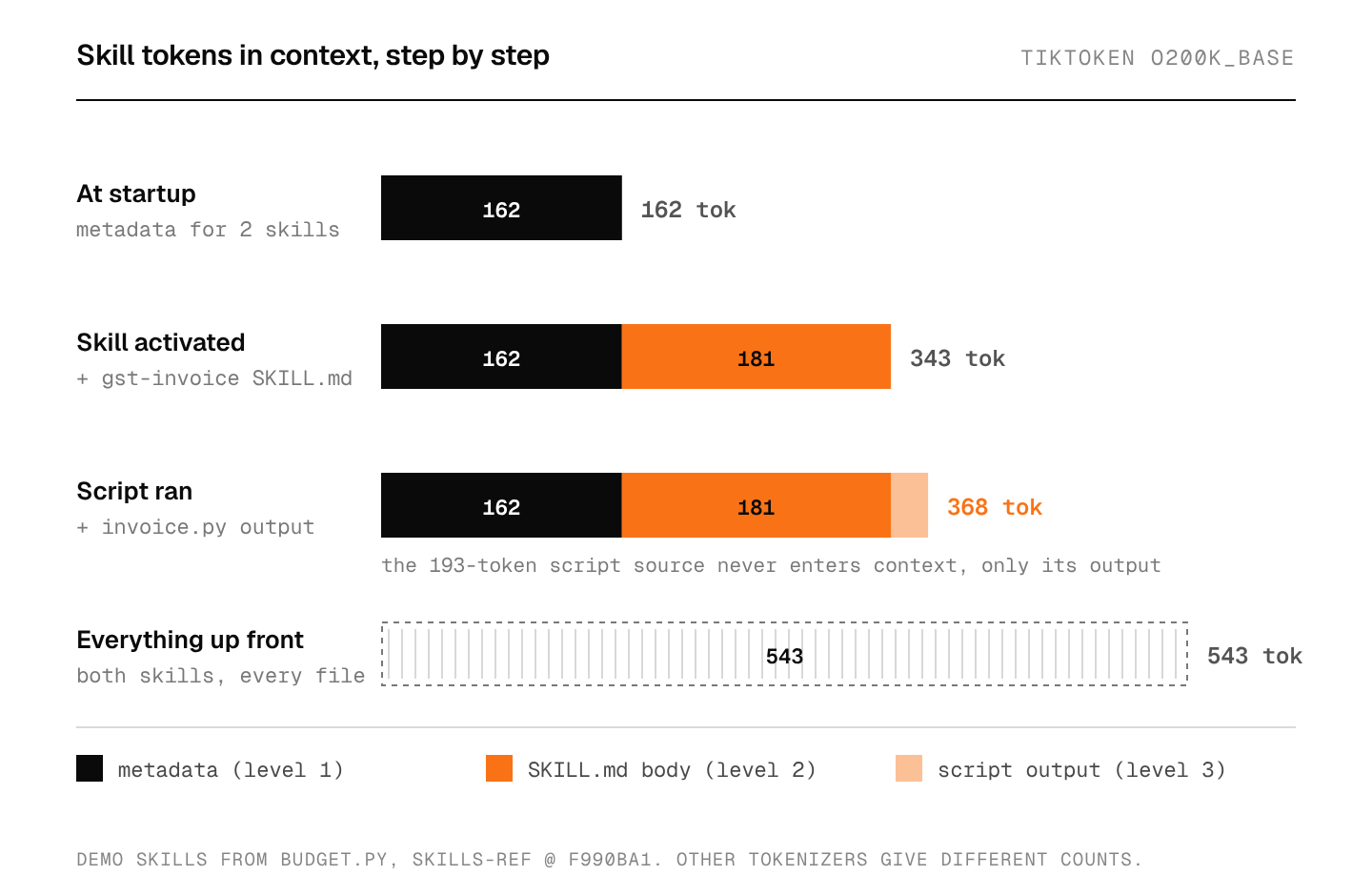
With two skills the saving is small: 368 tokens against 543 for loading everything. The point shows up at scale. At roughly 80 tokens of metadata per skill, 50 skills would cost about 4,000 tokens at startup (my arithmetic from the numbers above, not a measurement), while their bodies and files stay on disk until a task needs one of them. I showed in what a context window is how fast fixed overhead eats into a window when it’s resent every turn.
How are agent skills different from MCP and system prompts?
They answer different questions. A system prompt is text the model always sees. An MCP server gives the model functions to call in a separate process, and every connected tool’s schema sits in the context. A skill is instructions and code that the agent reads and runs inside its own environment, in stages.
| System prompt | MCP server | Agent skill | |
|---|---|---|---|
| What it is | Text | A server with tools, resources and prompts | A folder with SKILL.md, scripts and files |
| When it’s in context | Always | Tool schemas, whenever the server is connected | Name and description always; the rest on demand |
| Runs code | No | Yes, on the server | Yes, scripts in the agent’s environment |
| Needs | Nothing | A running server | A filesystem, plus code execution for scripts |
They combine well. A skill can tell the agent which MCP tools to call and in what order; Anthropic’s engineering post mentions exactly that pairing as something it’s exploring.
Where do agent skills break?
A vague description means the skill never fires. The model decides from the description alone whether to open a skill. The spec’s own bad example is description: Helps with PDFs. I’d write descriptions the way a user would phrase the request, with the nouns they’d use (“invoice”, “GST”, “quote with tax”).
The validator only checks format. skills-ref validate caught three problems in Release_Notes: uppercase, an underscore, and a top-level version field the spec doesn’t allow (it belongs under metadata). It can’t tell you that step 2 of your instructions is wrong.
A skill is code you run. Anthropic’s engineering post says plainly that malicious skills “may introduce vulnerabilities in the environment where they’re used or direct Claude to exfiltrate data and take unintended actions.” The integration guide lists sandboxing, allowlisting trusted skills, asking before dangerous operations, and logging every script run. I’d treat a skill from the internet like a shell script from the internet: read it before you install it. Instructions inside a skill are also one more place for injected text to reach the model, the same problem I wrote about in AI browsers and prompt injection.
Scripts need an environment. In Claude’s apps, skills require Code Execution and File Creation to be turned on. An agent without a filesystem can still read a SKILL.md as text, but it can’t run scripts/invoice.py.
Portable on paper. The file format is shared. How each agent matches descriptions, when it activates a skill, and whether it honors allowed-tools (the spec says support “may vary between agent implementations”) are up to each product. A skill that works in one agent should be tested in the next one.
Is the open standard worth building on?
My opinion: yes, for team procedures. A skill is a cheap way to give an agent team-specific knowledge: Markdown and a few scripts in a repo, with no server to run and nothing to deploy. I’d use skills for “how we do X” and MCP servers for live access to systems, and expect most agents to need both. What would change my mind is evidence that agents pick the wrong skill once they have hundreds installed; then the table of contents stops working and skills would need retrieval of their own.
FAQ
Are agent skills only for Claude?
No. The format is an open standard, and on December 18, 2025 the agentskills.io adoption list included Cursor, VS Code, GitHub, OpenCode, Amp, Letta and Block alongside Claude and Claude Code.
Do skills cost tokens when they aren’t used?
A little. Every installed skill’s name, description and path go into the system prompt at startup, about 80 tokens each in my demo. The SKILL.md body and bundled files cost nothing until the agent reads them.
What is the difference between a skill and an MCP server?
An MCP server is a separate process that exposes tools the model can call. A skill is a folder of instructions and scripts that the agent reads and runs itself. Skills teach a procedure; MCP connects a system. A skill can include steps that call MCP tools.
How do I check that a skill is valid?
Install skills-ref from the agentskills repo and run skills-ref validate path/to/skill. It checks the frontmatter fields, the naming rules and that the folder name matches name. The README notes the library is for demonstration, not production.
Sources
- Anthropic, Equipping agents for the real world with Agent Skills, October 16, 2025, updated December 18, 2025
- Claude blog, Skills for organizations, partners, the ecosystem, December 18, 2025
- Agent Skills overview and the agentskills/agentskills repo: specification, integration guide and adoption list as of December 18, 2025
- skills-ref at commit
f990ba1 - tiktoken 0.12.0