What is MCP? The Model Context Protocol, explained
MCP is an open protocol that lets AI apps find and call tools over JSON-RPC. See the four messages a host sends, with a runnable Python server and client.
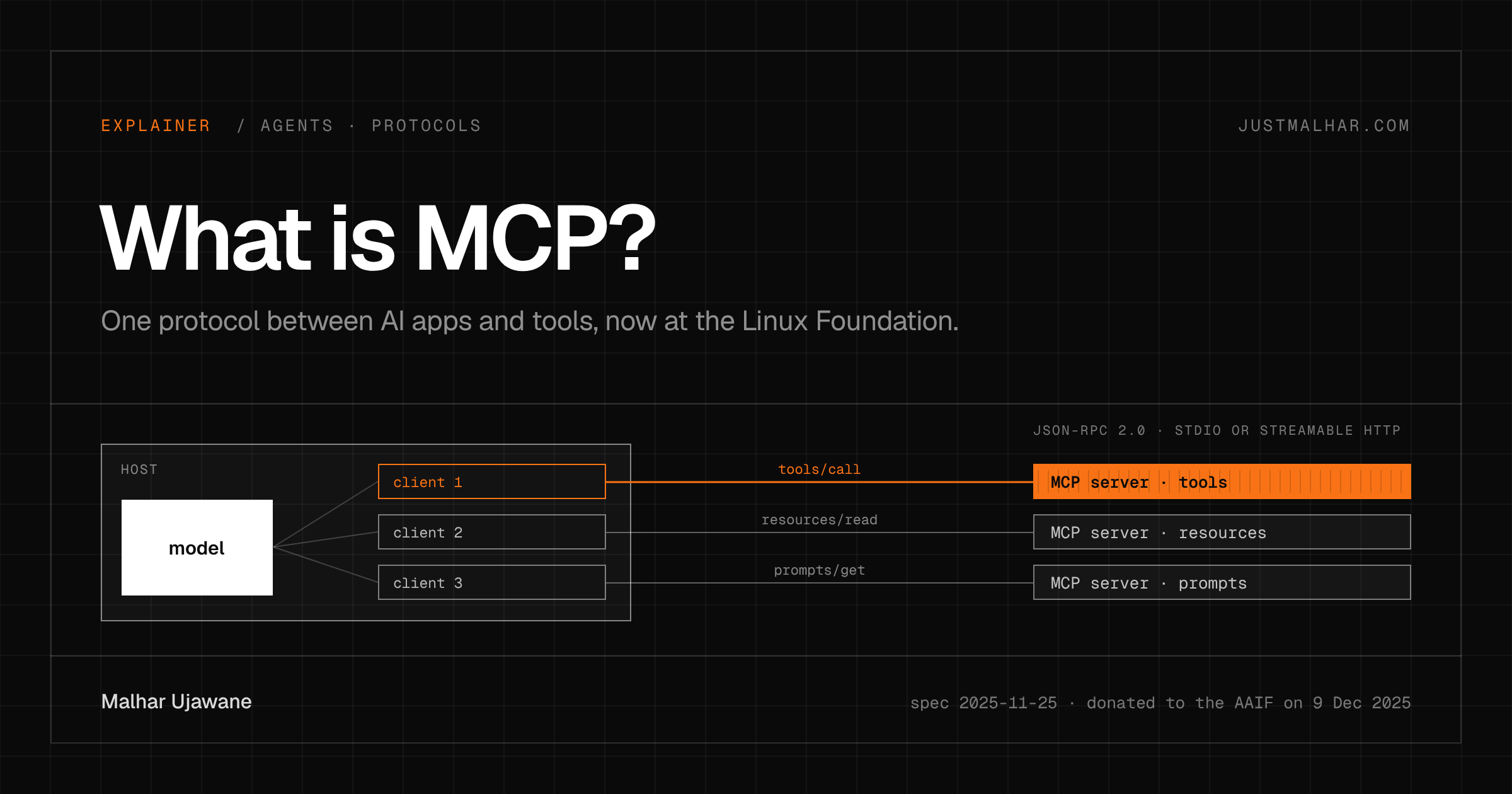
MCP (the Model Context Protocol) is an open protocol that lets an AI app discover and call tools, read data and fetch prompt templates from any server that speaks it, over plain JSON-RPC. On December 9, 2025, Anthropic donated it to the new Agentic AI Foundation under the Linux Foundation, so the protocol no longer belongs to one model vendor.
What happened to MCP this week?
The Linux Foundation announced the Agentic AI Foundation (AAIF) with three founding projects: Anthropic’s MCP, Block’s goose agent and OpenAI’s AGENTS.md. Anthropic, Block and OpenAI co-founded it, with Google, Microsoft, AWS, Cloudflare and Bloomberg backing it.
For people who build on MCP, the maintainers’ post is the one to read. The same maintainers keep making technical decisions through the SEP (spec enhancement proposal) process; the foundation’s board handles budget, members and which projects join. The post also gives the scale: over 97 million monthly SDK downloads, 10,000 active servers, and client support in ChatGPT, Claude, Cursor, Gemini, Microsoft Copilot and VS Code.
That’s a year after Anthropic open-sourced MCP in November 2024. So this is a good moment to explain what the protocol is, from the wire up.
Why does MCP matter to a builder?
Without a shared protocol, every AI app needs its own integration with every tool: a GitHub plugin for one chat app, a different one for an IDE, a third for your own agent. With MCP you write a server once and any MCP host can use it, the same way the Language Server Protocol let one language server work in many editors. The spec names LSP as its inspiration.
The cost side matters too. Every tool a host loads becomes a name, a description and a JSON schema in the model’s context, billed on every turn. I covered how that adds up, and one way around it, in code execution with MCP.
What does an MCP server look like?
Here is the smallest useful one, using the official Python SDK. It exposes one tool that totals a freelance invoice with GST. The function’s type hints become the tool’s input schema and its docstring becomes the description the model reads.
# server.py: the smallest useful MCP server.  pip install mcp==1.23.3
from mcp.server.fastmcp import FastMCP

mcp = FastMCP("invoices")

@mcp.tool()
def invoice_total(hours: float, rate_inr: int, gst_percent: float = 18.0) -> str:
    """Total for a freelance invoice in rupees, with GST."""
    subtotal = hours * rate_inr
    return f"subtotal ₹{subtotal:,.0f}, total ₹{subtotal * (1 + gst_percent / 100):,.0f}"

if __name__ == "__main__":
    mcp.run()          # stdio: JSON-RPC messages, one per line, on stdin and stdout
To see what a host does with it, skip the client library and talk to the server by hand. This script starts server.py as a subprocess and writes JSON-RPC messages to its stdin, one per line, which is the whole stdio transport.
# wire.py: talk to server.py with raw JSON-RPC, no MCP client library.
import json, subprocess, sys

srv = subprocess.Popen([sys.executable, "server.py"], stdin=subprocess.PIPE,
                       stdout=subprocess.PIPE, stderr=subprocess.DEVNULL, text=True)

def send(msg):
    print("->", json.dumps(msg)[:110])
    srv.stdin.write(json.dumps(msg) + "\n"); srv.stdin.flush()

def recv():
    reply = json.loads(srv.stdout.readline())
    print("<-", json.dumps(reply, ensure_ascii=False)[:110])
    return reply

send({"jsonrpc": "2.0", "id": 1, "method": "initialize", "params": {
    "protocolVersion": "2025-11-25", "capabilities": {},
    "clientInfo": {"name": "wire.py", "version": "0.1"}}})
recv()
send({"jsonrpc": "2.0", "method": "notifications/initialized"})

send({"jsonrpc": "2.0", "id": 2, "method": "tools/list"})
tool = recv()["result"]["tools"][0]
print("   schema:", json.dumps(tool["inputSchema"]["properties"]))

send({"jsonrpc": "2.0", "id": 3, "method": "tools/call", "params": {
    "name": "invoice_total", "arguments": {"hours": 12.5, "rate_inr": 2500}}})
print("   text:", recv()["result"]["content"][0]["text"])
srv.terminate()
Output (Python 3.13.5, mcp 1.23.3; long lines cut at 110 characters by the script):
-> {"jsonrpc": "2.0", "id": 1, "method": "initialize", "params": {"protocolVersion": "2025-11-25", "capabilities"
<- {"jsonrpc": "2.0", "id": 1, "result": {"protocolVersion": "2025-11-25", "capabilities": {"experimental": {}, "
-> {"jsonrpc": "2.0", "method": "notifications/initialized"}
-> {"jsonrpc": "2.0", "id": 2, "method": "tools/list"}
<- {"jsonrpc": "2.0", "id": 2, "result": {"tools": [{"name": "invoice_total", "description": "Total for a freelan
   schema: {"hours": {"title": "Hours", "type": "number"}, "rate_inr": {"title": "Rate Inr", "type": "integer"}, "gst_percent": {"default": 18.0, "title": "Gst Percent", "type": "number"}}
-> {"jsonrpc": "2.0", "id": 3, "method": "tools/call", "params": {"name": "invoice_total", "arguments": {"hours":
<- {"jsonrpc": "2.0", "id": 3, "result": {"content": [{"type": "text", "text": "subtotal ₹31,250, total ₹36,875"}
   text: subtotal ₹31,250, total ₹36,875
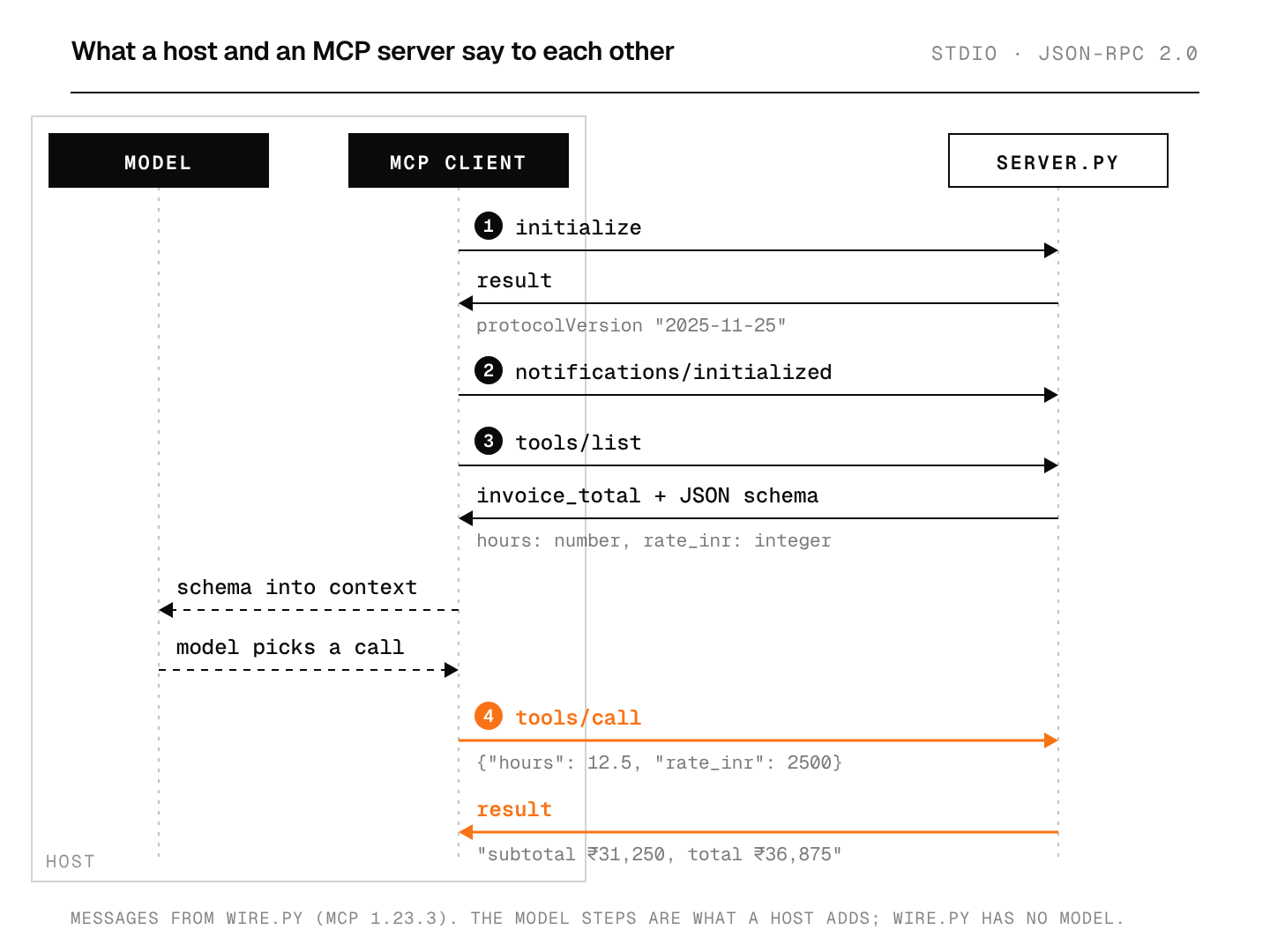
That’s the protocol in four messages. The client and server agree on a version (2025-11-25, the spec revision current this week), the client asks what tools exist, and then it calls one. The numbers in the invoice are made up; the messages are real.
In a real host, the model sits between tools/list and tools/call. The host puts the tool’s name, description and schema into the model’s context, the model decides to call invoice_total with some arguments, and the host forwards that call to the server and pastes the result back into the conversation. The model never talks to the server directly.
How does MCP work?
The 2025-11-25 spec defines three roles:
- Host: the AI app the user runs, such as an IDE, a chat app or your own agent.
- Client: a connector inside the host, one per server.
- Server: a program that offers capabilities.
Servers can offer three kinds of things. Tools are functions the model can call. Resources are data the user or the model can read, such as a file or a database row. Prompts are templates the user can pick. Clients can offer things back to servers too: sampling (the server asks the host’s model for a completion), roots (which folders the server may work in) and elicitation (the server asks the user a question).
All of it travels as JSON-RPC 2.0 over one of two standard transports. With stdio, the client launches the server as a subprocess, exactly as wire.py does, and the server must write nothing to stdout except MCP messages (logs go to stderr). With Streamable HTTP, the server runs on its own at one endpoint such as https://example.com/mcp, takes each message as a POST, and can stream replies with server-sent events. Local tools use stdio; hosted ones use HTTP.
Where does MCP break, and what would I do about it?
A tool is arbitrary code. The spec says so in its security section: tools “represent arbitrary code execution”, hosts must get user consent before invoking one, and tool descriptions and annotations should be treated as untrusted unless they come from a trusted server. A malicious server can put instructions in a tool description and the model will read them. I wrote about the same failure in AI browsers and prompt injection; MCP adds another place for untrusted text to enter the context. I’d install servers the way I install npm packages, from sources I can read, and keep destructive tools behind a confirmation.
Local HTTP servers. The transport spec warns that a local Streamable HTTP server must validate the Origin header and should bind to 127.0.0.1, or a website can reach it through DNS rebinding. If you write one, follow that literally.
Context cost. Twenty servers with ten tools each means two hundred schemas in every request, resent on every turn, as I showed in what a context window is. Load the servers a task needs, and keep descriptions short and specific; the model reads every word you put there.
stdout. The most common bug in a homemade stdio server is a stray print(). Anything on stdout that isn’t a JSON-RPC message corrupts the stream, so log to stderr.
What does the move to the Linux Foundation change?
Technically, nothing this week: the maintainers say the people and process stay the same. My read is that it lowers the risk of building on MCP. A server I write today is less likely to be stranded by one company’s product decision, and OpenAI and Google sitting on the same foundation as Anthropic makes a competing protocol less likely. That’s an opinion; what would change my mind is a large host shipping its own incompatible tool protocol next year.
FAQ
Is MCP only for Claude?
No. The protocol is open, and by December 2025 the maintainers list ChatGPT, Cursor, Gemini, Microsoft Copilot and VS Code among the clients that support it.
What is the difference between MCP and function calling?
Function calling is how one model API lets the model request a call to a function you described in that request. MCP handles the part around it: how the host finds those functions and runs them on a separate server, so the same server works with any model and any host. Hosts still use function calling to let the model pick an MCP tool.
Who controls MCP now?
The project’s maintainers, through the SEP process, under the Agentic AI Foundation, a directed fund of the Linux Foundation. The foundation’s governing board handles budget and membership, and the Linux Foundation says projects keep their own technical direction.
Do I need the SDK to build an MCP server?
No. As wire.py shows, it’s newline-delimited JSON-RPC, so any language that can read stdin and write stdout can do it. The SDKs save you the schema generation, version negotiation and transport code.
Sources
- Anthropic, Donating the Model Context Protocol and establishing the Agentic AI Foundation, December 9, 2025
- Linux Foundation, Formation of the Agentic AI Foundation, December 9, 2025
- MCP blog, MCP joins the Agentic AI Foundation, December 9, 2025
- OpenAI, OpenAI co-founds the Agentic AI Foundation, December 9, 2025
- Model Context Protocol specification, 2025-11-25 (Wayback, December 10, 2025) and its transports page
- Anthropic, Introducing the Model Context Protocol, November 2024
- mcp 1.23.3 on PyPI, released December 9, 2025