Kimi K3.1 Pro: what one coding-agent session costs
Kimi K3.1 Pro lists at half Opus 5.5's price, but cache hits narrow the gap. Session cost math, Moonshot's benchmarks, and the cyber data it removed.
Moonshot AI released Kimi K3.1 Pro on October 23, 2026: a 3T-class open-weight model with a 1M-token context window, priced at $2 per million input tokens and $10 per million output. I care about two things in that launch. What does one coding-agent session cost on it, and what did Moonshot mean when it wrote that it removed cyber-related data from training on purpose?
What is Kimi K3.1 Pro?
K3.1 Pro is a post-trained version of Kimi K3, released with a faster sibling, K3.1 Pro Highspeed, which Moonshot says runs 2 to 3 times faster. Both are available on Kimi.ai, Kimi Code and the Kimi API, and the release post says the full weights ship by November 4, 2026.
The facts a builder needs, all from Moonshot’s own pages as of October 24:
- Model IDs are
kimi-k3.1-proandkimi-k3.1-pro-highspeed. The quickstart says you can call them through Chat Completions, Responses or Messages, so the OpenAI and Anthropic SDKs both work with a changedbase_url. - Every K3-series model gets a 1,048,576-token context window (pricing docs).
- OpenRouter lists it as
moonshotai/kimi-k3.1-proat the same $2 input, $0.20 cache read and $10 output per million tokens (model page). - If you’re still on K2: new accounts lose access to K2 models on October 31, 2026, and Moonshot plans to retire the whole K2 series by the end of December.
Everything below is pricing math, Moonshot’s published numbers and my read of them, plus the setup steps OpenRouter and Anthropic document for running the model inside Claude Code. There are no hands-on test results in this post.
What does a coding-agent session cost on Kimi K3.1 Pro?
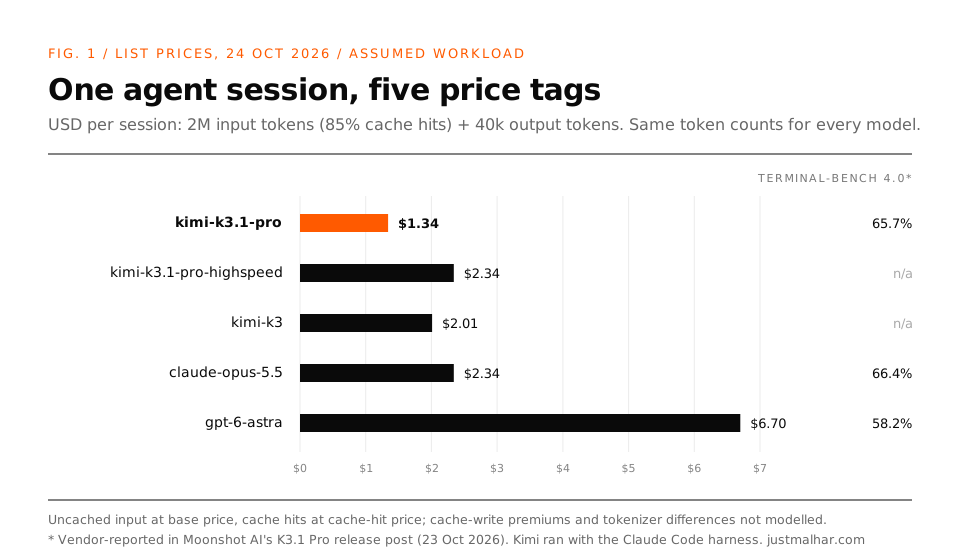
Here are the list prices I checked on October 24, 2026, in USD per million tokens, from Kimi, Anthropic and OpenAI:
| Model | Input | Cache hit | Output |
|---|---|---|---|
| kimi-k3.1-pro | $2.00 | $0.20 | $10.00 |
| kimi-k3.1-pro-highspeed | $4.00 | $0.20 | $20.00 |
| kimi-k3 | $3.00 | $0.30 | $15.00 |
| claude-opus-5.5 | $4.00 | $0.20 | $20.00 |
| gpt-6-astra | $10.00 | $1.00 | $50.00 |
On headline prices, K3.1 Pro is exactly half of Opus 5.5. That number is misleading for agent work, and the reason is how a harness talks to the model.
A coding agent re-sends the whole conversation on every turn: system prompt, tool definitions, files it read, earlier tool output. Most of that prefix is identical to the last turn, so it hits the prompt cache. Input tokens dominate the bill, and most of those are billed at the cache-hit price. Kimi and Opus 5.5 both charge $0.20 for a cache hit.
So I wrote the smallest script that prices one session. The session numbers are an assumption, chosen to look like a long agent run. Swap in your own usage logs.
# session_cost.py: what does one coding-agent session cost on each model?
# Prices: USD per 1M tokens, list prices checked 2026-10-24 on each vendor's pricing page.
PRICES = {
    #  model                      input  cache_hit  output
    "kimi-k3.1-pro":            (2.00,  0.20,  10.00),
    "kimi-k3.1-pro-highspeed":  (4.00,  0.20,  20.00),
    "kimi-k3":                  (3.00,  0.30,  15.00),
    "claude-opus-5.5":          (4.00,  0.20,  20.00),
    "gpt-6-astra":              (10.00, 1.00,  50.00),
}

# An assumed agent session, not a measurement. Swap in your own usage logs.
SESSION = {
    "input_tokens": 2_000_000,   # everything the harness re-sends across ~60 turns
    "cached_share": 0.85,        # share of input that hits the prompt cache
    "output_tokens": 40_000,     # code, tool calls, reasoning summaries
}

def session_cost(model, s=SESSION):
    inp, hit, out = PRICES[model]
    cached = s["input_tokens"] * s["cached_share"]
    fresh = s["input_tokens"] - cached
    usd = (fresh * inp + cached * hit + s["output_tokens"] * out) / 1_000_000
    return usd

if __name__ == "__main__":
    base = session_cost("kimi-k3.1-pro")
    print(f"{'model':26s} {'$/session':>10s} {'x kimi':>7s} {'$/100 sessions':>15s}")
    for m in PRICES:
        c = session_cost(m)
        print(f"{m:26s} {c:>10.3f} {c/base:>7.2f} {c*100:>15.2f}")
Output, Python 3.13.5:
model                       $/session  x kimi  $/100 sessions
kimi-k3.1-pro                   1.340    1.00          134.00
kimi-k3.1-pro-highspeed         2.340    1.75          234.00
kimi-k3                         2.010    1.50          201.00
claude-opus-5.5                 2.340    1.75          234.00
gpt-6-astra                     6.700    5.00          670.00
Two things jump out. Highspeed costs exactly what Opus 5.5 costs for this session, so “pay double for speed” puts you at Anthropic’s price. And Opus is 1.75x Kimi here, short of the 2x the price table suggests. The gap shrinks as the cache share grows, because the cache-hit price is the same on both:
# cache_gap.py: how the Opus 5.5 / Kimi K3.1 Pro price gap moves with cache hit rate
from session_cost import PRICES, SESSION, session_cost

print(f"{'cached':>7s} {'kimi $':>8s} {'opus $':>8s} {'opus/kimi':>10s}")
for share in (0.0, 0.50, 0.85, 0.95):
    s = dict(SESSION, cached_share=share)
    k, o = session_cost("kimi-k3.1-pro", s), session_cost("claude-opus-5.5", s)
    print(f"{share:>7.0%} {k:>8.3f} {o:>8.3f} {o/k:>10.2f}")
cached kimi $ opus $ opus/kimi
0% 4.400 8.800 2.00
50% 2.600 5.000 1.92
85% 1.340 2.340 1.75
95% 0.980 1.580 1.61At a 95% cache share the difference is 1.61x, and output tokens are now most of what separates the two bills.
Where this math breaks, so you don’t over-trust it:
- Tokenizers differ. The same session isn’t the same number of tokens on every model. Anthropic’s pricing page says Claude 4.7 and later models use a tokenizer that produces about 30% more tokens for the same text. I showed how much tokenizers disagree in What are tokens in AI?, where one Gujarati sentence came out at 58, 37 and 8 tokens.
- Cache writes aren’t free. I billed uncached input at the base price. Anthropic charges 1.25x base for a 5-minute cache write; Kimi lists cache writes for K3.1 Pro at $2.00, the same as its input price. That nudges the gap slightly wider than my table.
- Effort settings change output. Moonshot ran its benchmarks at reasoning effort
max, and a model that thinks longer bills more output.
To price a real session, replace the SESSION numbers with your own usage. If you route Claude Code through OpenRouter (setup below), its Activity dashboard records token usage per request, reasoning tokens included.
How good is it, by Moonshot’s own numbers?
On Terminal-Bench 4.0, Moonshot reports 65.7% for K3.1 Pro, against 66.4% for Claude Opus 5.5 and 58.2% for GPT-6 Astra. The footnote matters: Moonshot evaluated K3.1 Pro “with the Claude-Code harness”, and took competitor scores from their own blogs or the official leaderboard.
That’s a vendor number. It’s where I start, and I’d want to reproduce one task before I move client work. Still, a model within a point of Opus on a terminal-agent benchmark, at roughly 57% of the per-session cost in my example, earns a real test.
The finance section has one claim I found more interesting than the benchmarks. On an internal stress test of factual accuracy, Moonshot says the claim-level hallucination rate fell from 23.4% on K3 to 8.3% on K3.1 Pro, and adds that these “do not represent overall error rates in daily use.” I like that they printed the caveat next to the number.
One small thing I noticed: on October 24 the K3.1 Pro quickstart in Moonshot’s docs still had template placeholders like “[xx.x%]” where the benchmark scores should be. Use the release post for numbers.
Why did Moonshot remove cyber data from K3.1 Pro?
This is the section of the release post I’d read twice. Moonshot noticed vulnerability-research ability climbing as post-training scaled, traced it to cyber content sitting in the general mid-training corpus and to cyber tasks in the RL environment mix, and removed that data from both stages for the open-weight release.
They also published the cost of that decision. On xdev-bench-hard, their in-house benchmark of vulnerability discovery and exploitation tasks, a checkpoint trained without the removal solves 90.5% of problems at pass@3. The released K3.1 Pro solves 81.0%. And they wrote the policy down:
First, we aim not to release open weights that would extend the absolute frontier of cyber capability. K3.1 Pro’s offensive cyber capability is, by design, below what our pipeline can produce, and remains behind that of frontier proprietary models.
What stands out to me is that they put a number on what they left out: nine and a half points on their own benchmark, measured against their own unrestricted checkpoint.
My read, labelled as opinion: it’s a sensible line, and also hard to check. xdev-bench-hard is internal, so nobody outside Moonshot can reproduce the 90.5 vs 81.0 gap, and once weights are public anyone can fine-tune on whatever data they like. The disclosure is still useful to me as a builder. It tells me where Moonshot thinks the risk sits, and it fits the pattern I’ve been writing about this week: Anthropic using models to write formal proofs at scale, and NVIDIA’s OpenShell keeping credentials out of agent sandboxes entirely.
How do I run Kimi K3.1 Pro in Claude Code through OpenRouter?
OpenRouter exposes an endpoint compatible with the Anthropic Messages API, so Claude Code talks to it directly with no local proxy in between. The steps below come from OpenRouter’s Claude Code guide and Anthropic’s LLM gateway docs, both read on October 24, 2026. The model slug is moonshotai/kimi-k3.1-pro, from OpenRouter’s model page.
Read OpenRouter’s own warning first. Its guide says Claude Code with OpenRouter “is only guaranteed to work with the Anthropic first-party provider,” and that “Claude Code is optimized for Anthropic models and may not work correctly with other providers.” Its Claude Code tutorial is blunter: non-Anthropic models “aren’t supported through the native endpoint.” Kimi through this route is off the supported path, so try it on a scratch branch before a client repo.
1. Install Claude Code
The native installer for macOS, Linux and WSL:
curl -fsSL https://claude.ai/install.sh | bashOr through npm, which needs Node.js 18 or newer:
npm install -g @anthropic-ai/claude-code2. Point Claude Code at OpenRouter
Create an API key in your OpenRouter dashboard, then add these lines to ~/.zshrc or ~/.bashrc. They’re copied from OpenRouter’s guide:
export OPENROUTER_API_KEY="<your-openrouter-api-key>"
export ANTHROPIC_BASE_URL="https://openrouter.ai/api"
export ANTHROPIC_AUTH_TOKEN="$OPENROUTER_API_KEY"
export ANTHROPIC_API_KEY="" # Important: Must be explicitly empty
The base URL is https://openrouter.ai/api, with no /v1 on the end. Claude Code sends ANTHROPIC_AUTH_TOKEN as an Authorization: Bearer header, which is what OpenRouter reads; ANTHROPIC_API_KEY has to be an empty string, because a real Anthropic key there goes out as x-api-key and Claude Code may authenticate against Anthropic instead.
Keep the OPENROUTER_API_KEY line above the ANTHROPIC_AUTH_TOKEN line. The token expands when the profile loads, so a key defined further down leaves it empty and every request fails with an auth error. Then reload:
source ~/.zshrc # or ~/.bashrc, or open a new terminal3. Set Kimi K3.1 Pro for every model role
Claude Code picks a model per role, and OpenRouter’s guide overrides each role with an environment variable. Its example points them at Anthropic aliases such as ~anthropic/claude-opus-latest[1m]. To run everything on Kimi, put the Kimi slug in all five:
export ANTHROPIC_DEFAULT_FABLE_MODEL="moonshotai/kimi-k3.1-pro[1m]"
export ANTHROPIC_DEFAULT_OPUS_MODEL="moonshotai/kimi-k3.1-pro[1m]"
export ANTHROPIC_DEFAULT_SONNET_MODEL="moonshotai/kimi-k3.1-pro[1m]"
export ANTHROPIC_DEFAULT_HAIKU_MODEL="moonshotai/kimi-k3.1-pro[1m]"
export CLAUDE_CODE_SUBAGENT_MODEL="moonshotai/kimi-k3.1-pro[1m]"
Why [1m]: OpenRouter’s troubleshooting notes say Claude Code assumes a 200k context window unless the model name ends in [1m], and OpenRouter strips the marker before routing. It lists K3.1 Pro at 1,048,576 tokens, so the suffix keeps Claude Code from compacting at 200k. Set all five, since Anthropic’s model configuration docs say the Haiku variable also covers background work, and a role you leave unset keeps resolving to a Claude model on the same OpenRouter key.
To scope the setup to one project, the guide’s alternative is .claude/settings.local.json in the project root. The first four keys below are its block verbatim; the model keys are the same variables as above:
{
  "env": {
    "ANTHROPIC_BASE_URL": "https://openrouter.ai/api",
    "ANTHROPIC_AUTH_TOKEN": "<your-openrouter-api-key>",
    "ANTHROPIC_API_KEY": "",
    "CLAUDE_CODE_ENABLE_GATEWAY_MODEL_DISCOVERY": "1",
    "ANTHROPIC_DEFAULT_FABLE_MODEL": "moonshotai/kimi-k3.1-pro[1m]",
    "ANTHROPIC_DEFAULT_OPUS_MODEL": "moonshotai/kimi-k3.1-pro[1m]",
    "ANTHROPIC_DEFAULT_SONNET_MODEL": "moonshotai/kimi-k3.1-pro[1m]",
    "ANTHROPIC_DEFAULT_HAIKU_MODEL": "moonshotai/kimi-k3.1-pro[1m]",
    "CLAUDE_CODE_SUBAGENT_MODEL": "moonshotai/kimi-k3.1-pro[1m]"
  }
}
CLAUDE_CODE_ENABLE_GATEWAY_MODEL_DISCOVERY is optional: it adds OpenRouter’s curated list to the /model picker, and pinned variables bypass the picker anyway. Don’t put any of this in a plain .env file, which the native installer doesn’t read, or in a project’s .claude/settings.json, which gets committed with your key in it. If you create settings.local.json by hand, add it to your gitignore first. And when a settings file and your shell both set a variable, Anthropic’s docs say the settings file wins, so a stale value there overrides your exports without telling you.
4. Clear any old login and start
If you’ve ever logged in to Claude Code with an Anthropic account, run this once inside Claude Code, then quit and relaunch:
/logoutA cached login sitting next to a gateway key triggers auth-conflict warnings and, per the guide, confusing model-not-found errors. Then start a session:
cd /path/to/your/project
claude
5. Check that requests reach Kimi
Anthropic’s gateway docs suggest a one-token request straight to the gateway before you open Claude Code. Here it is with the model swapped for the Kimi slug:
curl -sS -w '\n%{http_code}\n' -X POST "$ANTHROPIC_BASE_URL/v1/messages" \
  -H "Authorization: Bearer $ANTHROPIC_AUTH_TOKEN" \
  -H "anthropic-version: 2023-06-01" \
  -H "content-type: application/json" \
  -d '{"model": "moonshotai/kimi-k3.1-pro", "max_tokens": 1, "messages": [{"role": "user", "content": "."}]}'
A JSON body that starts with {"id":"msg_ means the URL, key and model all work. A 401 means the key was rejected. With no key at all, OpenRouter returned this on October 24:
{"type":"error","error":{"type":"authentication_error","message":"No cookie auth credentials found","error_type":"authentication"},"request_id":null}
401
Inside Claude Code, run /status. OpenRouter’s guide shows the lines to look for:
> /status
Auth token: ANTHROPIC_AUTH_TOKEN
Anthropic base URL: https://openrouter.ai/api
If the auth line names ANTHROPIC_API_KEY, or a Login method line names a Claude account, the environment never reached the session. Then open /model to confirm the roles you set, and check the model column in the OpenRouter Activity dashboard, where requests should show moonshotai/kimi-k3.1-pro.
What OpenRouter lists for K3.1 Pro
As of October 24, 2026, from the model page and OpenRouter’s public models API:
- Price: $2 input, $0.20 cache read and $10 output per million tokens, the same as Kimi’s direct price, so the session math above carries over. OpenRouter’s tutorial says it doesn’t mark up token prices; buying credits carries a 5.5% fee with a $0.80 minimum. No cache-write price is listed for this model.
- Providers: standard routing uses one endpoint, Moonshot AI. A Moonshot AI Highspeed endpoint is listed at $4 / $0.20 / $20 and isn’t used in standard routing.
- Caching in practice: the page’s price-history table showed a 95.5% cache hit rate on the Moonshot endpoint and an effective input price of $0.28 per million. That’s across all OpenRouter traffic to the model, close to the 95% row in
cache_gap.py. - Tool calling: the model accepts
tools,tool_choiceandreasoning. That’s API support, and the compatibility warning above still applies. - /fast: no effect here. The guide says Claude Code only sends
speed: "fast"for supported Claude Opus model IDs.
If Kimi is the only non-Claude model you want, Kimi’s own endpoint below is the path Moonshot documents for Claude Code. OpenRouter fits better when you already pay through it and want every request in one dashboard.
The direct route: Kimi’s own endpoint
Kimi also exposes an Anthropic-compatible Messages endpoint, and its Claude Code guide sets everything through the env block in ~/.claude/settings.json. Its curl check is the fastest way to confirm a key works before you touch Claude Code:
curl https://api.moonshot.ai/anthropic/v1/messages \
  --header "Authorization: Bearer YOUR_MOONSHOT_API_KEY" \
  --header "Content-Type: application/json" \
  --data '{"model": "kimi-k3.1-pro", "max_tokens": 1, "messages": [{"role": "user", "content": "hi"}]}'
With no key, it fails like this (checked October 24):
{"error":{"message":"Incorrect API key provided","type":"incorrect_api_key_error"}}
HTTP 401
Two warnings from that guide that will save you an hour. The env block in settings.json overrides variables exported in your shell, so a stale ANTHROPIC_BASE_URL from an old experiment quietly wins. And the guide says to set every model tier (Opus, Sonnet, Haiku, Fable, subagent), because a tier left unset requests a model name the Kimi endpoint doesn’t know and that scenario fails silently. The guide’s example still uses kimi-k3[1m] as the model value.
The same file holds your Kimi key in plain text. Keep it out of git and out of any directory an agent can read.
Who should try Kimi K3.1 Pro?
I’d try it first on long agent loops where the input bill dominates and the task has a test suite that can tell me if the output is right: refactors, migrations, dependency upgrades. Work without that kind of safety net can stay on the model you already trust until K3.1 Pro passes the same task.
The test I’d run is boring on purpose. Same repo, same task, same harness, two models, each in its own git worktree so they can’t step on each other. Then compare three numbers: did the tests pass, how many tokens did it bill, how long did it take. With the OpenRouter setup above, each worktree can carry its own .claude/settings.local.json, so the model variables are the only thing that differs between the two runs.
Where is this heading?
My opinion, and the evidence behind it.
Open-weight prices are falling while scores rise. K3 lists at $3 / $15; K3.1 Pro lists at $2 / $10 with better benchmark numbers. That’s one release, so treat it as a single data point. It’s still the direction I’d bet on.
Cache-hit and output prices matter more than input price. Kimi and Opus 5.5 both charge $0.20 per million cached tokens. For agent work, the headline input price matters less every month.
The harness is becoming the constant. Moonshot benchmarked its model inside Claude Code, and its docs ship setup guides for Claude Code, Codex, OpenCode and OpenClaw. Models are turning into swappable parts behind a harness you already use.
Open releases will ship with capability-removal disclosures. Moonshot published a before-and-after number for what it cut. I expect other labs releasing open weights to face questions about where their equivalent number is.
What would change my mind on the price point: a real session where K3.1 Pro needs twice the turns Opus needs to finish the same task. Then the cheaper model is the more expensive one. That’s the test I want to run first.
Links
- Introducing Kimi K3.1 Pro, Moonshot AI, October 23, 2026
- Kimi API pricing and platform price list
- Use Kimi in Claude Code
- Claude Code integration guide, How to use Claude Code with OpenRouter and the Kimi K3.1 Pro model page, OpenRouter
- Connect Claude Code to an LLM gateway and Model configuration, Claude Code docs
- Claude pricing and OpenAI API pricing
- Hacker News discussion
- My related posts: What are tokens in AI?, Git worktrees for parallel AI coding agents